
Overview
The Dynamic Grid framework lets you attach custom actions to each grid item in your Dynamic Grid. You can define various action types, some requiring Apex classes or Flows. This guide walks you through creating and configuring these actions.
Prerequisites
Dynamic Grid and Dynamic Grid Actions require Member Portal
Learn more about Salesforce Flows Here: https://trailhead.salesforce.com/content/learn/trails/build-flows-with-flow-builder
Action Return Types
When you create a custom dynamic grid action, after executing, it can complete in several ways:
|
Return Type |
Description |
|---|---|
|
None |
Does nothing (ex: The user closes an informational modal) |
|
Refresh |
Refreshes the current page |
|
Named Page |
Redirects user to an Experience Site page by API name (can add parameters) |
|
Web Page |
Redirects user to any external website |
|
Error |
Displays an error toast with a custom message |
Configuring Parameters to Pass to Actions
You can pass parameters (like record IDs) from the grid item’s data source to your actions.
-
How to Configure:
-
Define parameters as a comma-separated list of keys in the “Parameters” field of the action’s custom metadata.
-
For SOQL-based sources, any queried field can be a parameter.
-
For Apex-based sources, specify any class property.
-
Apex Actions
Apex actions allow you to run custom Apex code from a Dynamic Grid item.
Steps to Create an Apex Action
-
Implement the Interface:
Create a class that implementsnamz.DynamicGridAction. -
Implement the Method:
Implementexecute()and return a result using factory methods likecreateRefreshResult(). -
Handle Arguments:
Parameters configured in metadata are passed as a map to your class.
Create Your Apex Class
-
Start by implementing the
namz.DynamicGridActioninterface:global with sharing class MyGridAction implements namz.DynamicGridAction { global namz.DynamicGridActionResult execute(namz.DynamicGridActionContext context) { // <– Your custom business logic here return namz.DynamicGridActionResult.createRefreshResult(); } } -
Requirements:.
-
Implement
namz.DynamicGridAction.execute(). -
Return one of the available action return types by calling one of the
namz.DynamicGridActionResult.create...factory methods. There is at least one factory method per return type.
-
Handling Received Arguments
Any parameter configured in the Dynamic Grid Action Custom Metadata Type will be passed as an argument through the namz.DynamicGridActionContext passed to the execute method.
This has a single data property which is a Map of String to Object corresponding to the requested parameters.
Important: The keys of the map will always be lowercased.
For example, let’s say that you specified that you want the parameters Id, znu__ListPrice__c in the “Parameters” field. This means the data field will contain a map with 2 keys: id, and znu__listprice__c, and the appropriate values depending on the clicked item.
Examples of Action Types
None Action
global with sharing class MyGridActionNone implements namz.DynamicGridAction {
    global namz.DynamicGridActionResult execute(namz.DynamicGridActionContext context) {
        // e.g., update some records, then do nothing
        return namz.DynamicGridActionResult.createNoneResult();
    }
}
What happens: The current page is reloaded.
Refresh Action
global with sharing class MyGridActionRefresh implements namz.DynamicGridAction {
    global namz.DynamicGridActionResult execute(namz.DynamicGridActionContext context) {
        // e.g., update some records, then refresh UI
        return namz.DynamicGridActionResult.createRefreshResult();
    }
}
What happens: The current page is reloaded.
Redirect Actions
Web Page
Navigates the user to a fully qualified external address.
global with sharing class MyGridActionRedirectAbsolute implements namz.DynamicGridAction {
    global namz.DynamicGridActionResult execute(namz.DynamicGridActionContext context) {
        // e.g., update some records, then redirect user
        String url = 'https://www.google.com';
        return namz.DynamicGridActionResult.createWebPageRedirect(url);
    }
}
What happens: The browser navigates directly to https://www.google.com in a new tab.
Named Page
Navigates the user to an experience site given an API name. Allows you to pass query parameters an an optional parameter to the method.
global with sharing class MyGridActionRedirectRelative implements namz.DynamicGridAction {
    global namz.DynamicGridActionResult execute(namz.DynamicGridActionContext context) {
        return namz.DynamicGridActionResult.createNamedPageRedirect('checkout__c', new Map<String, Object>());
    }
}
Error
Displays an error toast with the provided message
global with sharing class MyDynamicGridAction implements DynamicGridAction {
    global DynamicGridActionResult execute(DynamicGridActionContext context) {
        return DynamicGridActionResult.createErrorResult('My error');
    }
}
Register Your Action
Steps:
-
Go to Setup → Custom Metadata Types → Dynamic Grid Actions → Manage Records.
-
Click New and fill in the required fields.
-
Save.
|
Field |
Value Example |
|---|---|
|
Dynamic Grid Configuration |
Your Dynamic Grid Configuration record (ex: DynamicStore) |
|
Type |
Apex |
|
Context |
Your action class name (ex: MyGridActionRefresh) |
|
Display Label |
"Refresh Account" |
|
Parameters |
Comma separated list of parameters |
Flow-Based Actions (Screen & Autolaunched)
You can call a Flow from a grid action. Screen flows show in a modal and autolaunched flows run automatically.
Learn more about Salesforce Flows Here: https://trailhead.salesforce.com/content/learn/trails/build-flows-with-flow-builder
Configuring Input Variables
-
Parameters in metadata are passed as input variables to the Flow.
-
Variable names are lowercased, ant “__” and the "__c" will be removed.
|
Example Parameters for the Action |
Flow Input Variable Names |
|---|---|
|
Id, znu__ListPrice__c |
id, znulistprice |
Configuring the Return Type
The return type for a Flow is handled by a Flow Output Variable
-
Output variable name: ActionResult (case sensitive)
-
Type: Apex-Defined
-
Class:
namz__DynamicGridActionResult
The flow must assign a value to the Output Variable before running
|
Action Type |
How to Set in Flow Output Variable |
|---|---|
|
Refresh |
ActionResult.type = "REFRESH" |
|
Named Page |
ActionResult.type = "NAMED_PAGE"; ActionResult.value = API name |
|
Web Page |
ActionResult.type = "WEB_PAGE"; ActionResult.value = URL |
|
None |
Do not create ActionResult variable |
|
Error |
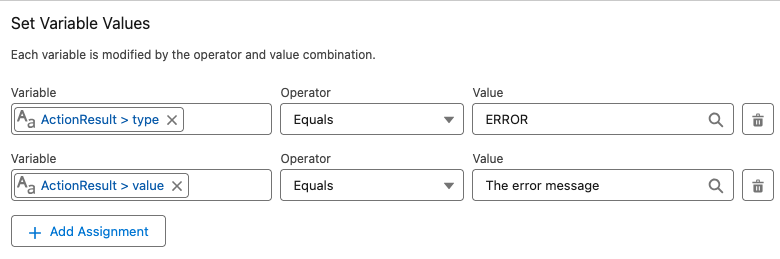
ActionResult.type = "ERROR"; ActionResult.value = error message |
Refresh
Assign the ActionResult.type value to “REFRESH” (case insensitive)

Named Page
Assign the ActionResult.type value to “NAMED_PAGE” (case insensitive) and the ActionResult.value to the API name of the Experience Site page you wish to redirect to.
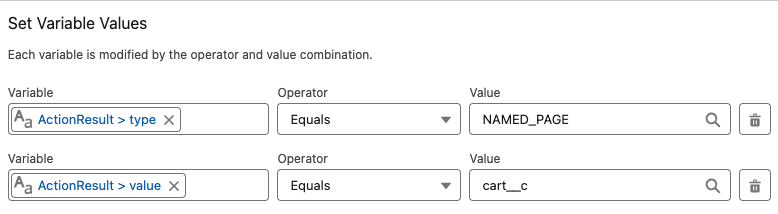
You can (optionally) also pass as many query parameters to the URL as desired by populating the ActionResult.params list with variables of type:
-
Apex-Defined -
Class:
namz__DynamicGridActionResultParameter
This variable type will allow you to provide a name and value to the query parameter

Web Page
Assign the ActionResult.type value to “WEB_PAGE” (case insensitive) and the ActionResult.value to the URL you wish to redirect to.
None
To do nothing and just close the modal, do not create an output variable named ActionResult.
Error
Assign the ActionResult.type value to “ERROR” (case insensitive) and the ActionResult.value to the error message you would like to display.
Register a Flow-Based Action
Steps:
-
Go to Setup → Custom Metadata Types → Dynamic Grid Actions → Manage Records.
-
Click New and fill in the required fields.
-
Save.
|
Field |
Value Example |
|---|---|
|
Dynamic Grid Configuration |
Dynamic Grid Configuration record name: (ex: Dynamic Store) |
|
Type |
Screen Flow or Autolaunched Flow |
|
Context |
Your Flow’s API name |
|
Display Label |
"Refresh Account" |
|
Parameters |
Comma separated list |
Web Page Actions
Redirect users to an external web page using a full URL.
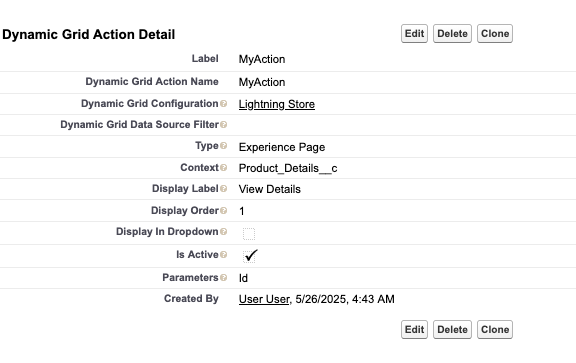
Experience Page Actions
Redirect users to an Experience Site page by API name. Any configured parameters are passed as query parameters.
Configuring Dynamic Grid Actions Filters
You can filter actions to control their visibility (ex: Only show Buy Now for products where Record Type Name = “Merchandise”)
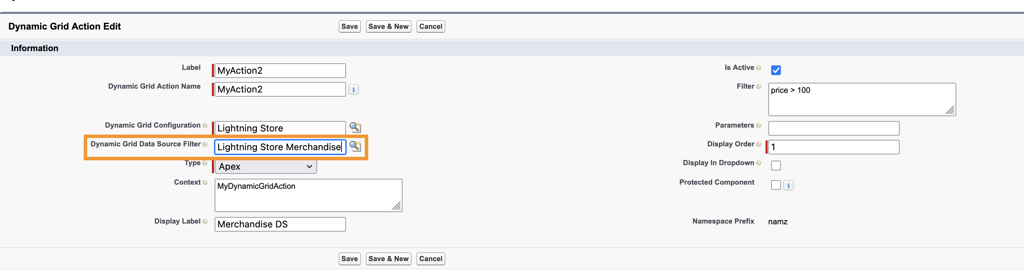
By Data Source
-
Select a Dynamic Grid Data Source to filter actions based on items retrieved via SOQL or Apex.
By Formula Filter
-
Use formula-based filtering for granular control to show actions on a per record basis
Important to note:
-
The fields or properties to use for filtering must be returned by the Data Source (SOQL or Apex)
-
When referencing a text value for comparison we must enclose in double quotes
description = "My Test Description" -
Fields used in the Filter are case-sensitive
idandIdrepresent different things.
Validate in the UI
-
Each grid item displays a button with your Display Label.
-
Clicking the button executes the action and reloads or redirects the user as configured.
Configuring Dynamic Grid "No Records Found" Messages
The Dynamic Grid component provides flexibility and control to update display messages when a query returns no results.
Key Capabilities
-
Contextual Messaging: Define unique messages for different grids (e.g., "You have no active memberships" vs. "No upcoming events found").
-
Conditional Visibility: Completely hide a grid from the page layout if it is empty to reduce clutter.
-
Smart Fallbacks: If no custom message is defined, the component automatically uses the standard system default.
Dynamic Grid Configuration Details
In the Dynamic Grid Lightning Web Component (LWC) configuration menu, you will find a new setting:
-
Actions Area Color: This option allows you to specify a color in the areas where actions are displayed.