
This is a list of every change made in the Summer '26 Seasonal Release of Nimble AMS.
Nimble AMS Staff View
What's New?
Enhancement: Support for Private Account Sharing in Affiliation and Address Flowdown
Improvements have been made to ensure that Affiliation Triggers function correctly when the Salesforce Organization-Wide Default (OWD) sharing setting for Accounts is set to Private. Previously, users encountered system errors when creating or updating a primary affiliation if they did not have explicit record-level access to the account’s current or previous primary affiliation record. This update is critical for supporting multi-tenant client orgs and associations with strict data privacy requirements.
Key Updates:
-
Updated the Address Flow down logic to execute in a "without sharing" context, allowing background data updates to complete regardless of the logged-in user's record visibility.
-
Fixed an issue in the Account Trigger handler that caused exceptions during the primary affiliation change process.
-
Ensured that Primary Affiliation records can be successfully created and updated by staff users even when the existing primary account record is hidden by sharing rules.
Your association will benefit if you allow:
-
Use Primary Affiliation
-
Use of Affiliation Triggers
Enhancement: Refunds are Now supported By Any Refund Payment Method
A recent change restricted the ability to refund to the original payment method. We have reverted this change, and now both Saved Payment Method and Credit Card refund options are presented. Select the method that matches how the original payment was made — Saved Payment Method for and Saved Payment Methods payments, Credit Card for credit card payments.
Your association will benefit if you allow:
-
Use of Refunds
-
Use of Stored Payment Methods
Enhancement: Performance Optimization for Cart Item Processing
To improve system stability and performance during high-volume checkout processes, we have implemented caching for the getCartMap method within the Cart Item trigger. This optimization is designed to significantly reduce the SOQL query count, preventing "Too Many SOQL Queries" errors.
Key Improvements
-
SOQL Query Reduction: By caching the results of the getCartMap query, the system avoids redundant database calls during a single transaction.
-
Checkout Reliability: This fix specifically addresses issues where complex carts (e.g., memberships combined with programs and coupons) were hitting Salesforce governor limits.
-
Internal Optimization: The getCartEntities method is now optimized to be called only once where previously multiple calls were triggered, streamlining the Cart Item trigger execution path.
Users will experience a more reliable checkout flow, especially when dealing with complex cart configurations. This update ensures that the platform can handle multi-item transactions and coupon applications without exceeding SOQL query limits.
Your association will benefit if you allow:
-
High-volume or complex cart transactions
Enhancement: Product Quantity Limit Increase
To support larger transaction volumes, we have increased the maximum allowable quantity for Products to 18 digits.
-
Change: Updated the length for the quantity attribute on the Product object.
-
Impact: Users can now enter product quantities up to 18 digits, providing greater flexibility for high-volume inventory and sales tracking.
Your association will benefit if you allow:
-
Use of high-volume product sales
Defects Fixed
Unable to Refund to Original Card After a Transfer Payment Has Been Used
Staff users were unable to process refunds to the original credit card or stored payment method for an Order that had undergone a Transfer Payment. When a refundable balance was owed after an Order was cancelled, the system only presented cash-based refund options, even if the initial payment was made via credit card.
Your association may be affected if you:
-
Utilize the Transfer Payment feature to move payments between line items within an Order and then cancel or adjust an Order item resulting in a refundable balance back to a credit card or stored payment.
Original System Design: The system is designed to allow staff to process refunds to the original payment method, including credit cards and stored payments, regardless of whether any intermediate payment transfers occurred within the Order.
Solution: Logic has been updated to ensure that the original credit card or stored payment method remains available as a refund destination, even after payments have been transferred between items within the same order.
Module(s) impacted: Payments, Orders, Refunds
Proforma Order batch tied to Experience Cloud Community
In Staff View, transactions created from processing a Proforma Order are incorrectly assigned to an Experience Cloud Community Hub batch once the Order is paid and submitted. On the Batch record the Source field is set to Experience Cloud Community Hub.
Your association may be affected if you:
-
Use Proforma Orders
-
Use Staff View
Original System Design: When a Proforma Order is paid and submitted the batch record should have Salesforce listed for the Source field.
Solution: Updated logic to display the correct label for the Source field.
Module(s) impacted: Proforma Orders, Staff View
Inactive Payment Gateway processed Flexible Payments
Flexible Payments (Scheduled, Installment, and Recurring Payments) continued to be processed after the payment gateway was set to inactive. Now, a validation prevents Flexible Payments from processing when the gateway is inactive.
Your association may be affected if you:
-
Use Flexible Payments
-
Use CardPointe
-
Use BluePay
-
Use Auth.net
Original System Design: No previous payment gateway validation was in place for the Flexible Payments.
Solution: Added validation to restrict payment processing of Flexible Payments, when the payment gateway is inactive. The validation checks the gateway’s Status_c field before the payment is processed.
Module(s) impacted: Flexible Payments, CardPointe, BluePay, Auth.net
Original Payment Method not available for refund
During the processing of a refund, Google Pay was not available as an option, although Google Pay was the Original Payment Method for the Order. When the Credit card that was linked to the Google Pay account was selected for the refund an error was received.
Your association may be affected if you:
-
Use Apple & Google Pay Support
Original System Design: Apple & Google Pay Support should be an option for refund.
Solution: Now during refund processing the Original Payment Method is available for selection.
Module(s) impacted: Apple & Google Pay Support
Membership Term Calculations ignored configured Account Membership field
An issue was identified where the Add Memberships To Proforma Order process did not correctly calculate terms for the Concurrent Memberships. Instead of using the configured Account Membership Field, the system incorrectly relied on a default Membership Expiration field, resulting in inaccurate term calculations.
Your association may be affected if you:
-
Use Unified Order Architecture (UOA)
-
Use Concurrent Memberships
Original System Design: For Concurrent Memberships, the Membership Term should be calculated by the latest Membership Record on the configured Account Membership Field on the Membership Type.
Solution: The Add Membership to Proforma Order process, now correctly calculates terms for Concurrent Memberships by checking the Account Memberships Field for Membership Type.
Module(s) impacted: Unified Order Architecture (UOA), Memberships, Concurrent Memberships
Express Payment Cart and Invoice page do not refresh Donation line items when Optional Donation is unchecked
On the Express Payment Cart page and corresponding Invoice page, the Optional donation line items were not automatically removed when a user unchecked a previously selected donation. As a result, the donation continued to appear in the Cart and Invoice totals until the page was manually refreshed.
Your association may be affected if you:
-
Use Donations
-
Use Express Payment Cart page
Original System Design: When the Optional Donation checkbox is unchecked, the associated donation line item should have been removed without a page reload.
Solution: Now, the donation line items will be removed when the Optional Donation checkbox is unchecked.
Module(s) impacted: Donations, Express Payment Cart page
Fixed issue with Cash Prepayment refunds
When using the Cash Prepayment feature, users create Payments with any payment type that has a Cash or Check record type. However, refunds failed if the payment name was not explicitly Cash or Check.
Your association may be affected if you:
-
Use Cash Prepayment feature
Original System Design: Cash Prepayment refunds should refund successfully regardless of the payment record name.
Solution: Cash Prepayment refunds display the correct payment records.
Module(s) impacted: Cash Prepayment
Cash Prepayment refund error with One Payment
When One Payment and Cash Prepayments features are enabled, the refunding of the Cash Prepayment results in an error and the payment cannot be refunded.
Your association may be affected if you:
-
Use One Payment
-
Use Cash Prepayment
Original System Design: Refunds for Cash Prepayments should not be possible through One Payment LWC.
Solution: Now the One Payment LWC will not present refunding option for Cash Prepayments.
Module(s) impacted: One Payment, Cash Prepayment
Manual Payment Transfer Issue When Auto Transfers Were Enabled
Manual payment transfers did not work when automatic payment transfers were enabled, causing payments to remain un-transferred after cancelling an order item. This occurred when an order contained a merchandise product with two or more additional products and at least one product was later cancelled. In this scenario, clicking the Transfer Payment button did not move the payment to an active order item as expected.
Your association may be affected if you:
-
Use Payment Transfers
Original System Design: Once the transfer payment button is clicked the payment should transfer to one of the active order items.
Solution: Manual payment transfers now work correctly alongside automatic transfers, allowing payments to be successfully transferred to active order items.
Module(s) impacted: Payment Transfers
Nimble Merges processes custom fields
Person Account merges performed through Nimble Merge, fail when a custom field is configured on the Contact object, resulting in a merge error.
Your association may be affected if you:
-
Use Nimble Merge
Original System Design: The Nimble Merge tool should merge Person accounts when custom fields are present.
Solution: Updated Nimble Merge to address custom fields.
Module(s) impacted: Nimble Merge
Split Functionality for "Allow Additional Discount"
The functionality of the "Allow Additional Discount" field has been split into two new fields—"Allow Special Price" and "Allow Discount" on product link object. As a result, the original field "Allow Additional Discount" has been deprecated and all its references have been removed from the product level. This update streamlines and enhances the accuracy of configuring special pricing and discounts for bundle child products.
Your association may be affected if you:
-
Use Product Bundles with complex pricing requirements
Original System Design: Users utilized the single "Allow Additional Discount" field to control both special pricing and additional discounts for bundle child products.
Solution: Deprecated the "Allow Additional Discount" field on the Product Link object and removed all its references from the product level. Introduced "Allow Special Price" and "Allow Discount" fields to replace the deprecated functionality, allowing users to independently enable special pricing and additional discounts.
Module(s) impacted: Product Bundles, Product Link Object
Community Hub
Defects Fixed
ACH/eCheck Payment Status and Failed Capture Handling
ACH/eCheck payments processed in Community Hub are marked as paid at submission, although the final capture occurs later via the payment capture job. If CardPointe declines the transaction during capture, the decline message was lost and the payment still indicated successful capture.
Your association may be affected if you:
-
Use CardPointe
-
Use Stored Bank Accounts
Original System Design: When the gateway declines a transaction the Payment record should accurately reflect the status.
Solution: Detailed failure information is stored on the Payment record when a payment fails to capture and the Gateway Status is updated to Error.
Module(s) impacted: CardPointe, Stored Payment Method
Inactive users reactivated during Community Hub Login attempt
Staff users attempting to log into Community Hub incorrectly reactivate the associated User record. This occurred regardless of whether the Login attempt was successful and the Staff use still received a “No community access” error message.
Your association may be affected if you:
-
Use Community Hub
Original System Design: Inactive Staff users should remain Inactive and receive a ‘User is inactive’ error when attempting to log in without any changes to the User record.
Solution: Updated logic to ensure that Inactive Staff users are no longer reactivated during Community Hub Login attempts.
Module(s) impacted: Community Hub
Date/Time Fields in Community Hub forms blocked submission
When Date/Time field was included in a Field Set Form in Community Hub (such as the Edit My Profile page), users encountered a validation error that prevented the form from being submitted, triggering the validation error: ‘Invalid Date and Time’. This occurred when the field was pre-populated with a value entered through Staff View.
Your association may be affected if you:
-
Use Community Hub
Original System Design: Date/Time fields should be editable in Community Hub.
Solution: Now, Date/time fields are editable in Community Hub.
Module(s) impacted: Community Hub
Express Payment Page Grand Total miscalculated
The Express Payment Page Grand Total was calculated incorrectly when an optional Donation was added to an Order that already included a Donation and Membership product.
Your association may be affected if you:
-
Use Express Payment Page
-
Use Donations
Original System Design: The Grand Total on the Express Payment Page should reflect updates to the Cart.
Solution: The Express Payment Page now shows correct Grand Total when adding, removing, or updating optional Donations
Module(s) impacted: Express Payment
Community Hub Registration Cancellation with Hosted Credit Cards now successful
In Community Hub, when an account has both a Billing and Shipping address, the Billing Street and Shipping Street fields display as a single line on the Order Summary page, however the address should display with the appropriate line breaks.
Your association may be affected if you:
-
Use Community Hub
-
Use Billing and Shipping address
Original System Design: The Billing Street and Shipping Street fields should display the same formatting as stored in Staff View.
Solution: Corrected address rendering on the Order Summary page to preserve line breaks in Billing Street and Shipping Street fields when Orders are placed through Community Hub.
Module(s) impacted: Community Hub
Downloadable Products LWC displays Download link for cancelled orders
A bug was identified where the Downloadable Products LWC component on the Digital Library page would continue to display a download link for products from orders that had been cancelled.
Your association may be affected if you:
-
Use the Downloadable Products LWC component in Community Hub.
-
Sell downloadable products that can be cancelled.
Original System Design: The Downloadable Products component should only display download links for active, valid purchases. Cancelled orders should automatically be filtered out and not appear in the Digital Library.
Solution: The Digital Library page has been updated to no longer display the download links for the downloadable products if their order has been cancelled.
Module(s) impacted: Downloadable Products, Order Management, Community Hub
Registrations getting purchased when Event is full
Issue: A bug was identified where Community Hub users were able to complete their registration for an event even if the event was already full (when the Max Number of Registrations equals the Total Registrants). This occurred if the user already had the event in their registration cart before the maximum capacity was reached.
Your association may be affected if you:
-
Use the Event Registration process with capacity in Community Hub.
-
Note: This issue does not affect associations using the Member Portal. The Member Portal correctly enforces validation checks on both page load and cart submission, stopping the registration if the event is full.
Original System Design: Once an event reaches maximum capacity, all attempts to register, including checking out an existing registration in the cart, should be blocked.
Solution: The validation logic on the checkout page has been corrected, and strict capacity validation is now enforced to ensure registrations cannot be completed once the event maximum capacity is reached.
Module(s) impacted: Event Registration, Community Hub Checkout
Member Portal
What's New?
Enhancement: Enable Batch assignment for Proforma Order processing
TO improve control over financial processing, this functionality has been enhanced to support specifying a Batch Id when invoking the ProcessProFormaOrder action. This ensures that transactions generated during Order processing are assigned to the intended batch, rather than defaulting to the current batch based on the transaction date.
Your association will benefit if you allow:
-
Use of Member Portal
-
Use of Proforma Orders
Enhancement: Product Bundles Combo now has option to Hide All Prices for child products in unassembled bundles
This enhancement adds a new field, labeled ‘Hide child Price.’ This allows administrators to enable or disable the display of all prices for unassembled Combo Bundles which ensures now pricing information for child products is shown. Only parent bundle price is shown when this improvement is enabled.
Your association will benefit if you allow:
-
Use of Member Portal
-
Use of Product Bundles Combo
Enhancement: Product Bundling supports Deferred Revenue Method Override
This enhancement introduces support for a Deferred Revenue Method Override at the Product Bundle level, enabling customized revenue recognition behavior for bundled offerings. The system looks to the Product Link Deferred Revenue GL Override when present, with automatic fallback to the child product’s deferred revenue GL value if no override exists.
Your association will benefit if you allow:
-
Use of Member Portal
-
Use of Product Bundles
Enhancement: Unified Look for the One Payment Wizard
We have updated the One Payment component to align with the Member Portal’s modern design system, ensuring a seamless and consistent user experience.
Key Updates
-
UI Consistency: The One Payment wizard has been transitioned to the Tailwind CSS framework to match the look and feel of the Member Portal.
-
Pill-Shaped Buttons: All primary action buttons within the payment flow—including Complete Payment, Proceed to Payment, Cancel, and Previous—now feature a standardized pill-shaped design, consistent with elements like the "My Orders" buttons.
Users will experience a more cohesive visual interface when managing orders and completing checkouts.
Your association will benefit if you allow:
-
Use of Member Portal
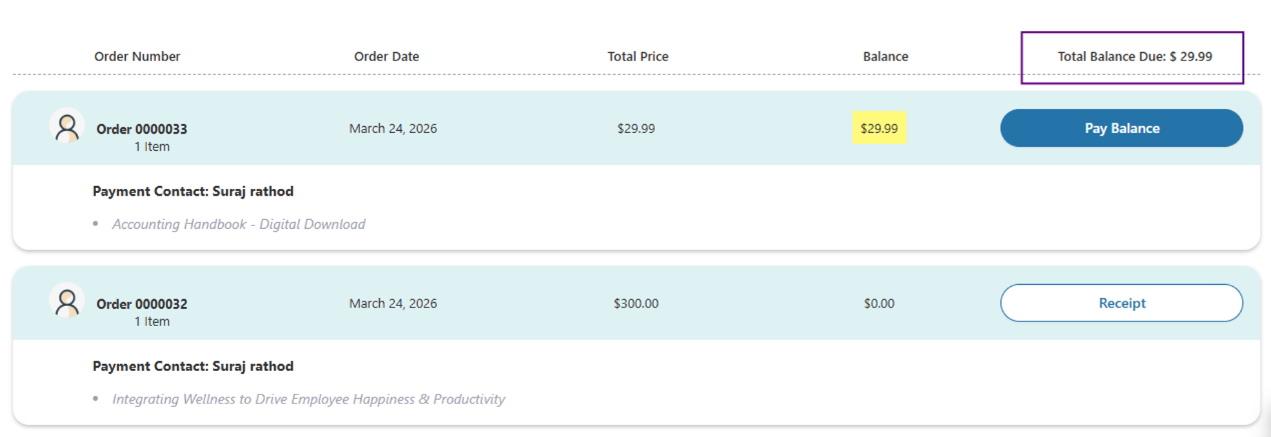
Enhancement: Enhanced Company Account Balance Visibility
This enhancement provides Member Portal users with a clear and real-time view of their company's total outstanding balance across all available invoices within the "My Order" component.
Key Updates:
-
New "Total Balance Due" Column: The "My Order" Lightning Web Component (LWC) now features a "Total Balance Due" column. This field automatically calculates and displays the sum of outstanding balances from all currently displayed orders.
-
Real-Time Balance Updates: The total balance is updated dynamically. As soon as a payment is processed, the system recalculates the outstanding dues, ensuring users always see the most accurate financial information.
-
Consolidated Financial View: By centralizing the total debt, organizations can provide their members and corporate contacts with immediate clarity on what is owed without requiring manual calculations across multiple records.
Your association will benefit if you allow:
-
Use of Member Portal
Enhancement: Dynamic Grid Customizable "No Records Found" Messages
We have enhanced the Dynamic Grid component to provide more flexibility when no results are returned by a query. Previously, all Dynamic Grids across your Member Portal shared a single global label for empty states. With this update, administrators can now tailor the messaging for each individual grid or choose to hide the grid entirely when it contains no data.
Key Updates:
-
Individual Grid Messaging: You can now define a specific message for each Dynamic Grid instance. This allows for more contextual guidance (e.g., "You have no active memberships" vs. "No upcoming events found") instead of a generic "No matching results" message.
-
"Hide if Empty" Option: A new configuration setting allows you to completely hide the Dynamic Grid component from the page if no records are found, keeping your Member Portal pages clean and focused.
-
Smart Fallbacks: If a custom message is not provided, the system will automatically fall back to the standard default label, ensuring users are never left without information.
Your association will benefit if you allow:
-
Use of Dynamic Grids within the Member Portal
Defects Fixed
Carts with Backordering products now submit successfully
When backordering is enabled, submitting a cart that includes a merchandise product with no available inventory triggers an error message and prevents submission of the Cart.
Your association may be affected if you:
-
Use Proforma Orders
-
Use Backordering
-
Use Hybrid Unified Order Architecture (UOA)
-
Use Member Portal
Original System Design: When Backordering is enabled, an order should be submitted successfully when there is no available inventory.
Solution: Updated backordering support for Proforma orders.
Module(s) impacted: Backordering, Proforma, Hybrid Unified Order Architecture (UOA), Member Portal
Processed Proforma Orders assigned to incorrect Batch
Proforma Orders processed in Staff View with payments applied, were incorrectly assigned to an Experience Cloud batch. This occurred when Staff users processed a Proforma Order, by manually applying a payment then submitting the Order, which results in the transaction being associated with the wrong batch.
Your association may be affected if you:
-
Use Proforma Orders
Original System Design: Proforma transactions processed by Stass should be placed in a non-Experience Cloud batch.
Solution: Updated the batch logic to ensure that Proforma Orders processed in Staff View are correctly associated with the non-Experience Cloud batch.
Module(s) impacted: Proforma Orders
Invoice Number not retained from cart to Order
The Invoice Number on a Cart was not retained during the transition to an Order. Instead, the value was overwritten with the Order Number, causing loss of the original Invoice reference. These impact clients using both Unified Order Architecture and Hybrid configurations and did not align with the expected Proforma Order processing behavior.
Your association may be affected if you:
-
Use Unified Order Architecture (UOA)
-
Use Hybrid Model
Original System Design: The Invoice Number should be retained through Cart to Order creation.
Solution: The update preserves the Invoice Number from the Cart through to Order creation, ensuring it is not overwritten by the Order Number.
Module(s) impacted: Unified Order Architecture, Hybrid Model
Dynamic Grid header displays on all Cards without actions enabled
When the header is not defined in Dynamic Grid, a header space is on all cards and actions are not enabled. The configuration for actions shows “do not display.”
Your association may be affected if you:
-
Use Dynamic Grid
Original System Design: The header should not render if actions are not enabled.
Solution: Removed an extra space in the Dynamic Grid header when action records are not present.
Module(s) impacted: Dynamic Grid
Custom fields now supported in Hybrid UOA
Custom fields on Products for Member Portal and Hybrid Unified Order Architecture (UOA) were not supported causing Orders to fail on submission when data was required.
Your association may be affected if you:
-
Use Member Portal
-
Use Hybrid Unified Order Architecture (UOA)
Original System Design: Custom fields should be supported through the Member Portal and Hybrid UOA.
Solution: Logic updates allow Orders to be successfully submitted for custom fields.
Module(s) impacted: Member Portal, Hybrid Unified Order Architecture (UOA)
Dynamic Grid Export generated blank file
An issue was identified where exporting data using the Dynamic Grid export/download option on the Directory page within Member Portal generated a blank file. The exported file contained only column headers and did not include record data.
Your association may be affected if you:
-
Use Member Portal
-
Use Dynamic Grid exports
Original System Design: The Dynamic Grid export should generate a file containing populated row values for all returned records based on the configured query or data source.
Solution: The Dynamic Grid exports from the Directory page now includes populated data.
Module(s) impacted: Member Portal, Dynamic Grid
Billing History Cart retention fixed for Member Portal Checkout
Addressed an issue in Member Portal, where the original Billing History Cart is prematurely deleted when users progress to the Order Checkout page during the renewal process. If the Membership is then removed from the Cart, users were unable to retry the renewal because the original Cart has been deleted and only the copied cart remains. This behavior has been corrected so Billing History Carts are only deleted after successful payment.
Your association may be affected if you:
-
Use Member Portal
-
Use Billing History
Original System Design: Billing History Carts should be deleted after the Order is processed and payment is successful.
Solution: Updated behavior so Billing History Carts are only deleted after successful payment.
Module(s) impacted: Member Portal, Billing History
$0 Order Confirmation emails did not send
When Unified Order Architecture is enabled the client saw Order Confirmation emails did not send for $0 Orders placed through Member Portal.
Your association may be affected if you:
-
Use Unified Order Architecture (UOA)
-
Use Member Portal
-
Use Order Confirmation emails
Original System Design: Order Confirmation emails for $0 Orders should be sent when Order is placed.
Solution: Updates code for the Order Confirmation email.
Module(s) impacted: UOA, Member Portal, Order Confirmation
Credit Balance on Account does not decrease after use on an order
An issue was identified where the credit balance on an account would not decrease once that credit was applied to an order. As a result, users were able to re-apply the full credit balance to subsequent orders, leading to inaccurate financial records.
Your association may be affected if you:
-
Use Credit Balance for an Order
Original System Design: Upon the application of a credit to an order, the credit balance on the associated account should be automatically updated to reflect the used amount.
Solution: The credit balance on the account will now accurately decrease after the credit is applied to an order.
Module(s) impacted: Accounts, Payments, Order Management
Crowd Wisdom
What's New?
Enhancement: Crowd Wisdom Integration now supports Proforma Orders
The Crowd Wisdom Integration supports the processing of Proforma Orders. Courses purchased now synchronize only after the Order is successfully processed, ensuring accurate and reliable syncing.
Your association will benefit if you allow:
-
Use of Crowd Wisdom Integration
Seasonal Permission Changes
See the Summer '26 Seasonal Release Permission Changes in the Security section.